Secure Document Management: Why the Vault Wins This Season
Your client files are scattered across email attachments, a shared Google Drive, your desktop, and "somewhere on the server." You know where everything is. Probably. Until a phishing email hits the wrong inbox and suddenly the question isn't where your files are, but who else has them.
Cyberattacks on accounting firms have surged since 2020, and with IRS Publication 4557, the FTC Safeguards Rule, and WISP requirements all tightening the screws, having a real system for protecting taxpayer data isn't optional anymore. That system is secure document management, and the right one does more than lock files behind a password. It turns them into something your firm can actually work with.
This article covers what secure document management means for tax professionals, why it matters now, and how Bizora's Vault keeps your documents protected while connecting them to citation-backed tax research.
Key Takeaways
- Secure document management means storing, organizing, and protecting taxpayer data with encryption, access controls, and audit trails that go beyond what generic cloud storage offers.
- Cyberattacks targeting tax professionals are increasing, and a single breach can cost a firm most of its client base.
- IRS Publication 4557 and the FTC Safeguards Rule require documented security systems from every firm that handles taxpayer data, with penalties reaching $100,000 per violation.
- Bizora's Vault combines secure document storage with AI-powered intelligence, letting you query across files, extract structured data, and feed documents directly into citation-backed research without leaving the platform.
- Generic cloud storage (Google Drive, Dropbox) wasn't built for the regulatory and workflow demands tax professionals face.
What Is Secure Document Management?
Secure document management is the system your firm uses to store, organize, share, and protect client documents while controlling who can access what and tracking every interaction. For tax professionals, that means more than dropping files into a cloud folder and hoping the password holds.
Tax work generates sensitive data at scale, from Social Security numbers and income details to K-1 allocations, engagement letters, and prior-year returns, all of which needs to be encrypted, access-controlled, and auditable under current federal requirements.
IRS Publication 4557 requires every tax preparer to maintain a Written Information Security Plan (WISP). The FTC Safeguards Rule classifies tax preparers as "financial institutions" with nine mandatory security elements, and the IRS Security Six adds baseline protections including MFA, drive encryption, and VPN.
Penalties under the FTC rule can reach $100,000 per violation.
Generic cloud storage platforms like Google Drive and Dropbox store files, but they weren't designed around any of this. They don't enforce document retention policies aligned with tax engagements and don't generate audit trails specific to taxpayer data.
They also don't offer the engagement-level organization that keeps one client's sensitive information separated from another's.
A secure document management platform built for tax work handles the storage and protection pieces properly. But most of them stop there, leaving your documents sitting in folders with no connection to the research, analysis, or memo drafting that actually makes them useful.
Why Secure Document Management Matters Right Now
The threat environment has gotten worse faster than most firms have adapted, and the consequences of getting it wrong go beyond a bad week. Here's what's driving the urgency:
- Targeted attacks on tax firms: Accounting firms aren't collateral damage in broad phishing campaigns anymore. Attackers know tax professionals hold Social Security numbers, income data, and financial records in bulk, and they're building campaigns around tax-season timing and industry-specific language to get past your team's defenses.
- Client loss after a breach: Client trust is the foundation of every tax engagement, and it disappears the moment their data is compromised. Smaller firms feel this hardest because there's no brand equity or corporate PR team to absorb the hit. Clients leave, referrals stop, and rebuilding takes years if it happens at all.
- Expanding regulatory requirements: IRS Publication 4557, the FTC Safeguards Rule, and WISP requirements all demand documented security systems with real enforcement. The PTIN renewal form (W-12) asks whether you have a written data security plan, and answering "yes" without one constitutes perjury. The IRS updated its WISP template (Publication 5708) in August 2024 with stricter MFA and breach notification rules.
- False sense of security from generic tools: A shared Dropbox folder with a strong password feels secure, but it doesn't meet any of the federal standards tax professionals are held to. The gap between "we store files in the cloud" and "we have a documented, enforceable system for protecting taxpayer data" is exactly where firms get exposed.
Secure document management isn't a compliance checkbox. It's the foundation that keeps your practice, your clients' data, and your professional reputation intact.
How Bizora's Vault Handles Secure Document Management
Bizora's Vault is built around two ideas: keep client documents protected and organized, and make those documents useful beyond just storage. It's a secure document management tool with AI-powered intelligence layered on top.
That means you can store files by engagement, query across them to extract structured data, and pull documents directly into Bizora's AI Assistant for citation-backed tax research, all without leaving the platform.
Here's how it works in practice:
Step 1: Setting Up a Project and Uploading Files
Start by creating a new project from the Vault dashboard and naming it after the client engagement.
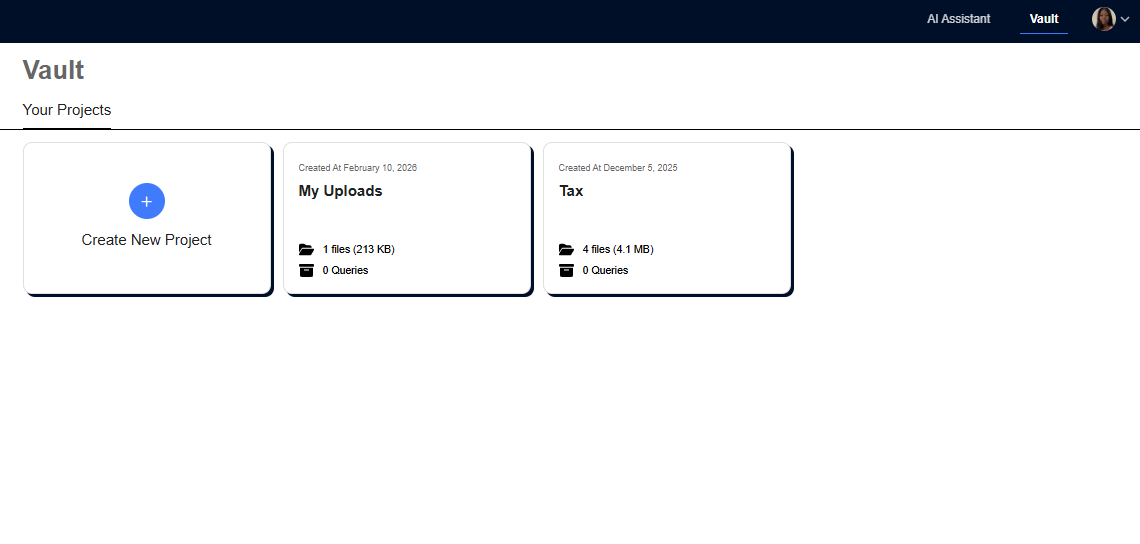
Each project serves as a dedicated workspace that holds up to 100 files, with sub-folders for organizing by entity, year, or document type.
Uploading is drag-and-drop or through the upload button, and the Vault accepts PDFs, spreadsheets, scanned documents, and the other formats tax professionals already work with.
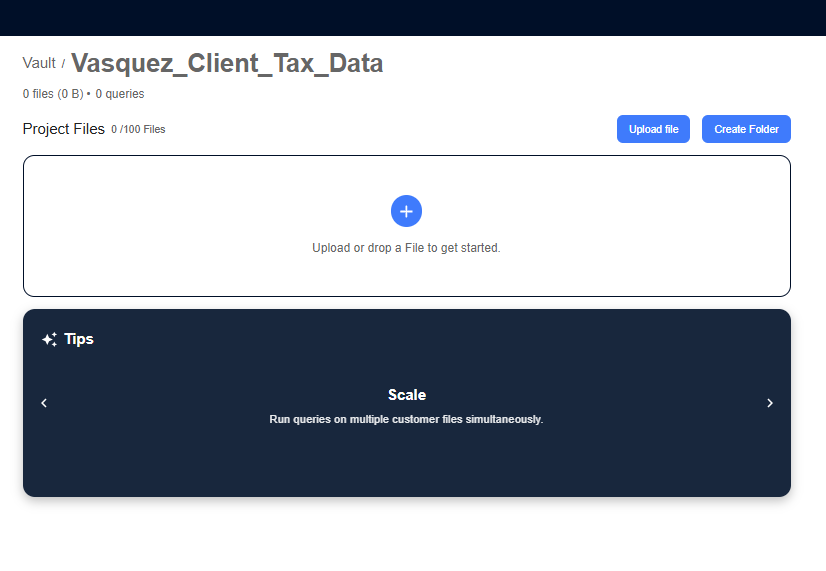
Every file is stored within the project's structure, keeping client engagements separated from each other.
Step 2: Querying Your Documents
Once files are in the project, the query box at the top of the page lets you ask questions across all of them at once. The box has a 255-character limit, so prompts need to be concise. An example that works for pulling together a client's tax picture:
"Analyze the uploaded documents. Identify and categorize all income, deductions, credits, and carryforward items. Summarize by category and highlight anything that may need further research."
A character counter tracks the length as you type.

Step 3: Building and Customizing the Output Table
After submitting a query, Bizora presents a Table Preview where you click "Create new Table" and select which files to process (individually or all at once). Based on the query, Bizora auto-generates column questions that define the output structure.
For tax data extraction, those columns might cover Taxpayer Info, Employment and Business Income, Investment and Rental Income, Deductions and Expenses, Payments and Allocations, and Research Issues. Every column is editable, and you can add up to 20, modify existing ones, or remove anything that doesn't fit the engagement.
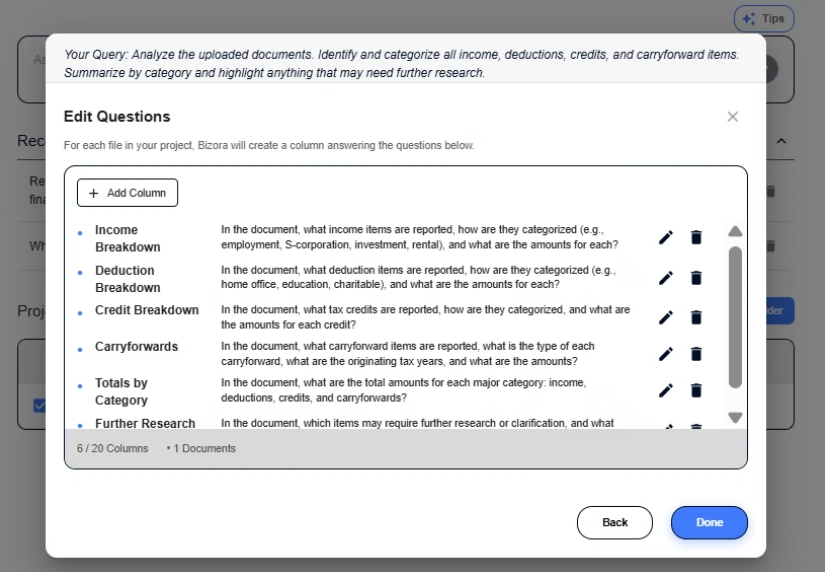
Clicking "Done" and then "Create Table" runs the query across your selected files and generates a structured table with one row per document and one column per category. Each cell holds the extracted information for that specific file and category.
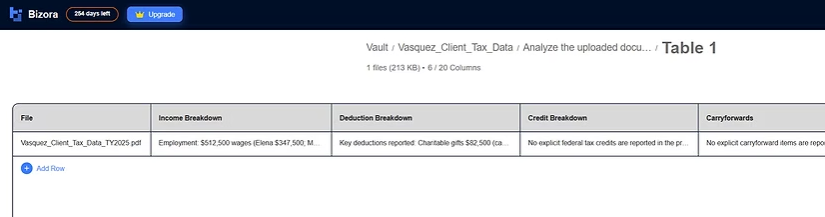
This is where batch processing saves real time. The Vault runs the same query across every file in the project simultaneously.
Upload ten client packages and run one query, and you get a ten-row table of organized, extracted data instead of repeating the same manual work ten separate times.
Step 4: Moving from Extraction to Research
When extracted data flags an issue that needs deeper analysis, the connection between the Vault and Bizora's AI Assistant keeps everything in one place. Open the AI Assistant, click the "+" button, select "Add from Vault," and the document loads directly into your research session with no re-uploading or platform switching required.
From there, Bizora analyzes the issue and drafts a research memo with inline citations from primary sources including IRC sections, Treasury regulations, revenue rulings, and case law. View Steps shows exactly where each answer came from, so you can verify the reasoning before using it.
The full cycle from uploading a client document to reviewing extracted data to drafting a citation-backed research memo happens without leaving the platform.
Try Bizora's Vault free for 7 days with no credit card required.
Secure Document Management Is the Starting Point
Tax season gets harder every year, and the regulatory environment around taxpayer data protection keeps tightening. The firms that get secure document management right protect their practice and their clients. The ones that go further and connect their documents to AI-powered research and analysis save themselves hours of manual work on top of that.
If your current setup involves scattered files, manual cross-referencing, and switching between three platforms to get from a client document to a research memo, the Vault is worth fifteen minutes of your time.
Frequently Asked Questions
What is the difference between a document vault and regular cloud storage?
Cloud storage platforms like Google Drive and Dropbox store files but weren't built for tax work, lacking engagement-level organization, tax-specific audit trails, and any connection to a research workflow. A document vault designed for tax professionals adds those layers, and an AI-powered vault like Bizora's goes further by letting you query and extract data across stored documents.
Do tax preparers need a written security plan?
Yes. IRS Publication 4557 requires all tax preparers to maintain a Written Information Security Plan (WISP), and the PTIN renewal form (W-12) asks whether you have one. False certification constitutes perjury. The IRS released an updated WISP template (Publication 5708) in August 2024.
Can I pull Vault documents into a research session?
Yes. Any document stored in the Vault can be added to an AI Assistant session by clicking the "+" button and selecting "Add from Vault," loading it directly into the conversation without re-uploading.
What file types does the Vault accept?
PDFs, spreadsheets, scanned documents, and the other common formats tax professionals work with.
Can I try the Vault before committing?
Yes. The seven-day free trial includes full Vault and AI Assistant access with no credit card required.