How to Extract Tax Data and Draft Memos in Minutes
Tax data extraction and memo drafting eat up more professional hours than almost any other part of an engagement. The workflow is always the same: pulling numbers from client documents, cross-referencing against prior-year returns, researching each issue separately, verifying citations, and writing the whole thing up from scratch.
For a moderately complex client, that process, extraction through a finished memo, takes anywhere from four to ten hours. Multiply that across your entire roster during busy season, and the math gets ugly fast.
It does not have to work that way. Bizora traces every citation back to primary source, the IRC section, Treasury Regulation, or case it originates from, so the position holds up when a partner, client, or IRS examiner asks for the authority behind it. The right AI tool compresses that entire pipeline into minutes, from raw client documents to a citation-backed research memo grounded in actual primary authority. Not the kind of AI output where you spend another hour on Google making sure it did not fabricate a Revenue Ruling.
This tutorial walks through two methods for doing exactly that using Bizora's AI Assistant and Vault. Both work whether you are a solo practitioner reclaiming billable hours or a firm looking to speed up how your team handles research.
Key Takeaways
- A standard tax research memo follows five sections: Facts, Issues, Authorities, Analysis, and Conclusion.
- Bizora's AI Assistant extracts client data and drafts a full citation-backed memo in one conversation.
- The Vault runs batch extractions across up to 100 client files at once, producing structured data tables.
- The traditional 4-to-10-hour memo process compresses to roughly 15 to 45 minutes with AI.
- Every citation Bizora generates is traceable to primary authority (IRC sections, Treasury Regulations, case law).
- You can make both the AI Assistant and Vault work together and use them individually.
What should a tax research memo include?
Before jumping into the workflow, here is what the end product looks like. A well-structured tax research memo follows a consistent format that holds up if the position is ever questioned. Partners expect it during review, the IRS expects it if they audit the position, and opposing counsel expects it if things go sideways.
The standard format has five sections:
- Facts: The relevant client data and circumstances: who the taxpayer is, what transactions occurred, what numbers are involved, and what filing positions are at issue. Getting a number wrong here means the entire analysis is built on a faulty premise, so accuracy in this section drives the reliability of everything that follows.
- Issues: The specific tax questions raised by those facts, framed precisely enough that each one can be researched independently. "Does the licensing revenue qualify as a non-SSTB activity under Section 199A?" is a researchable issue. "What are the tax implications?" is not. Isolating each question keeps the analysis focused and makes the conclusion traceable to a specific problem.
- Authorities: The applicable law: IRC sections, Treasury Regulations, Revenue Rulings, IRS Notices, and relevant case law. A memo that references "general tax principles" or cites a blog post will not survive scrutiny. This section should read like a bibliography of primary sources a reviewer can independently verify.
- Analysis: Where authority meets facts. Strong analysis walks through how the client's particular situation satisfies or fails each element of the applicable standard rather than restating the rule in general terms. When the answer is not clear-cut, this section acknowledges the gray area and explains why the recommended position is defensible.
- Conclusion: The recommended position, the estimated tax impact where quantifiable, action items for the client or engagement team, and any conditions that could change the outcome.
Producing just the memo itself, once the underlying data is already extracted, typically takes two to six hours through the traditional approach: researching each issue independently, finding and verifying citations, and writing the analysis. The full pipeline described above, extraction through a finished memo, is what runs the four-to-ten-hour range. The AI-assisted approach below compresses both stages significantly.
How to extract tax data and draft memos with Bizora
Bizora handles this workflow through two tools, each suited to a different situation.
The AI Assistant is conversational. Upload a client's tax documents, prompt it to extract data and identify issues, then prompt it to draft a full research memo with inline citations. This is the right path when working through a single client engagement and producing a complete memo is the goal.
The Vault produces structured data tables instead. Upload documents to a project folder, write a query, and Bizora generates a table with categorized columns across all uploaded files. This is the better option when batch-processing multiple clients or when the extracted data itself is the final work product rather than a narrative memo.
If you are comparing tools for this kind of workflow, we put together a detailed comparison of AI tools for drafting tax research memos that covers citation quality, pricing, and output differences across seven platforms.
Here is how each method works.
Method 1: Using the AI Assistant
Step 1: Log in and open the AI Assistant
After logging into Bizora, the main dashboard shows two primary tools in the top navigation: AI Assistant and Vault. Select the AI Assistant.
The interface includes a prompt bar at the bottom, a Tips panel with prompt guidance, and a Suggestions panel with common tax research questions. Conversation history appears on the left sidebar.

Step 2: Upload client tax documents
Click the + button next to the prompt bar to open the upload menu with four options:
- Upload files: browse from your computer or drag and drop
- Add from Vault: pull documents already stored in Bizora's Vault
- Xero: import directly from a connected Xero account
- Recent: quickly access documents from previous sessions
For most engagements, uploading directly or pulling from the Vault covers what is needed.

Pro tip: For repeat clients, upload their documents to the Vault once. Any future AI Assistant session can pull them in without re-uploading.
Step 3: Extract and organize the client data
With the document uploaded, prompt Bizora to pull the relevant information and organize it by category.
Example prompt for a married-filing-jointly client with multiple income sources:
"Review the attached client tax data package for Marcus and Elena Vasquez (TY2025, MFJ). Extract and summarize all key taxpayer information, income sources, deductions, and relevant financial data. Organize the summary by category (personal info, W-2 income, S-Corp/K-1, investments, rental property, foreign accounts, deductions, estimated payments). Flag any areas where the data raises potential tax research issues."
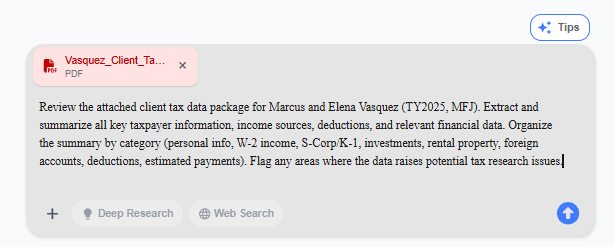
Within seconds, Bizora scans the document, pulls out the relevant figures, and organizes them by category. It also identifies tax issues that need attention.
From a single client data package, the extraction might flag:
- Section 199A SSTB classification and the de minimis threshold question
- Wash-sale disallowance under Section 1091 on stock sales with repurchases within 30 days
- Crypto staking reward characterization and DeFi yield reporting
- FBAR (31 U.S.C. § 5314) and FATCA (Section 6038D) filing obligations based on aggregate foreign account values
- Cost segregation catch-up method under Section 481(a)
- Multi-state estimated payment allocation issues
Every data point comes with a citation marker traceable to the source document. Review the extraction, confirm the numbers are accurate, and move on.
Step 4: Draft the research memo
Because the extraction already happened in the same conversation, Bizora has the full client context. Nothing needs to be re-explained.
Here is the prompt:
"Based on the client data you just extracted, draft a full tax research memorandum for Marcus and Elena Vasquez (TY2025). For each issue you identified, provide: a clear statement of the issue, the relevant facts from the client data, applicable law (IRC sections, Treasury Regulations, IRS guidance, case law), full citations to primary authority, your analysis applying the law to the facts, and a conclusion with a recommended position. Use standard tax memo format (Issue / Facts / Law / Analysis / Conclusion) for each issue. Cover all material tax issues present in the data."
Bizora generates the memo in standard format for each issue, with citations referencing actual IRC sections, Treasury Regulations, Revenue Procedures, and case law. Every citation is traceable, and the reasoning chain behind each conclusion is visible within the platform.

Step 5: Drill into specific issues (optional)
The initial memo covers all material issues at solid analytical depth. When a particular issue warrants deeper treatment, a follow-up prompt expands the analysis without starting over.
Example prompt for a deep-dive:
"Expand your analysis on the Section 199A SSTB disaggregation issue. Marcus's S-Corp earned $412,800 in ordinary income from management consulting, but $68,400 of that came from licensing proprietary frameworks and training materials sold separately. Analyze whether this licensing revenue can be carved out as a non-SSTB activity under Reg. 1.199A-5(c)(2). Include the de minimis threshold analysis and cite all relevant authority."
Bizora pulls in additional regulatory detail, relevant thresholds, and deeper case law references. Because the full client context is already loaded, the expanded analysis ties directly back to the client's actual numbers.
Step 6: Generate a client-friendly summary (optional)
When you need to send your findings to the client in plain language, input a prompt like:
"Create a 1-page client-facing summary letter for Marcus and Elena Vasquez that explains the key findings in plain language. Focus on action items and estimated tax impact of each issue. Keep it professional but accessible. No IRC section numbers in the client letter."
The output is a clean, professional summary covering key findings and action items. Copy it, paste it into your letterhead, send.
Method 2: Using the Vault
The Vault produces structured data tables instead of narrative memos. This is the faster path when processing multiple client files simultaneously or when extracted data needs to be organized into specific categories rather than written up as analysis.
Step 1: Create a new project
Go to the Vault from the top navigation bar.
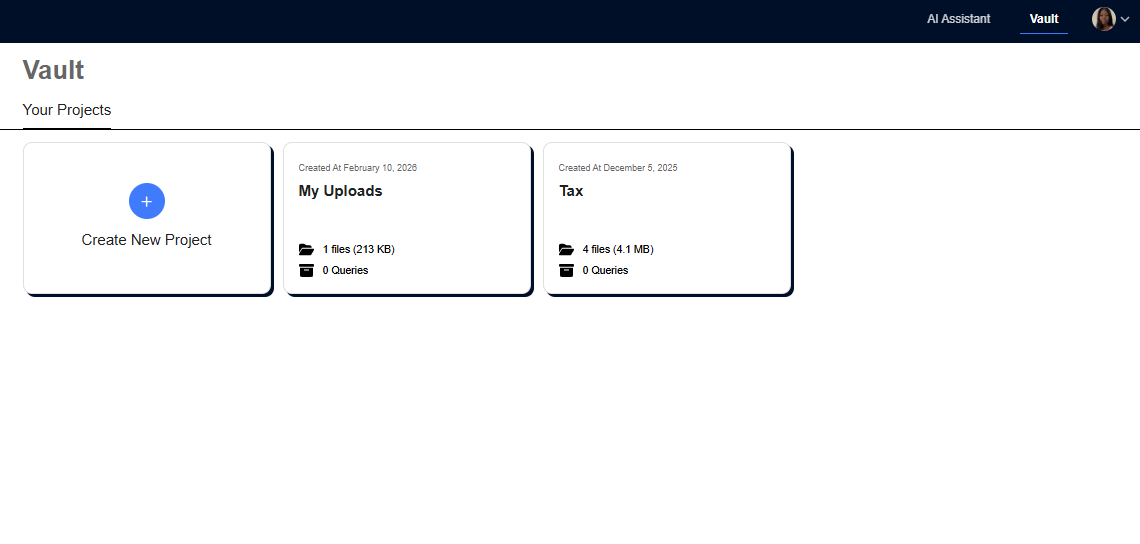
Click Create New Project, name it (for example, "Vasquez_Client_Tax_Data"), and hit Submit.
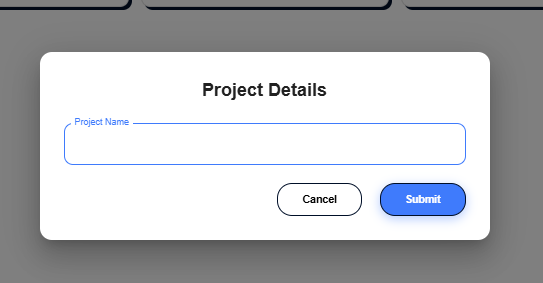
Each project functions as a dedicated folder for a client engagement, with capacity for up to 100 files.
2. Upload Documents
Inside the project, upload tax documents by dragging and dropping files or using the Upload file button. Folders can be created within the project to organize by entity, year, or category.
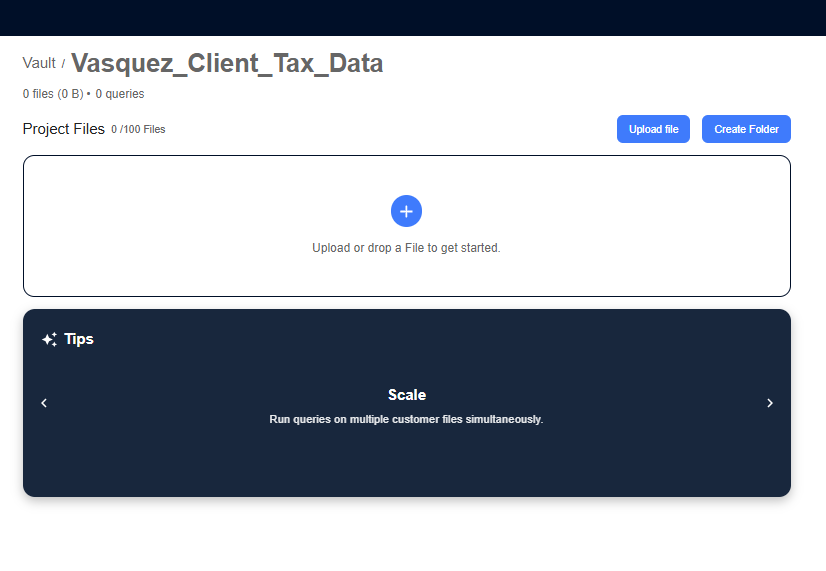
3. Write the Query
Type the extraction query into the query box at the top of the project page.
Important: The query box has a 255-character limit.
Here is an example that fits:
"Review the client tax data package. Extract and summarize all key taxpayer information, income sources, deductions, and relevant financial data. Organize the summary and flag any areas where the data raises potential tax research issues."
A character counter next to the query box tracks the length. If the first prompt runs over, tighten the language until it fits.
4. Create a Table
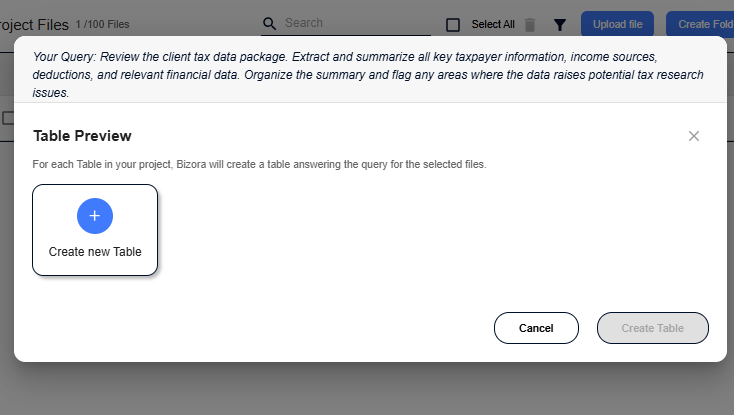
After submitting the query, Bizora presents a Table Preview dialog. Click Create new Table.
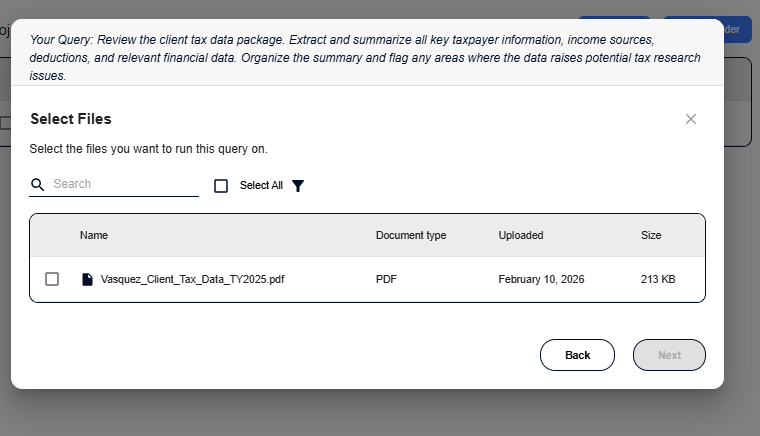
Then select which files to run the query against. Individual files can be selected, or Select All processes everything in the project.
5. Review and Edit the Column Questions
Based on the query, Bizora automatically generates column questions that define what data gets extracted. Each column becomes a category in the output table.
For a tax data extraction query, Bizora might generate columns like:
- Taxpayer Info: personal details, SSNs, addresses, filing status, dependents
- Employment & Business Income: W-2 wages, S-Corp income, business classifications
- Investment & Rental Income: capital transactions, rental activity amounts
- Deductions & Expenses: charitable contributions, home office, education
- Payments & Allocations: estimated payments, withholdings, multi-state allocations
- Research Issues: items that raise potential tax research questions or require further analysis
Columns can be added (up to 20 total), edited, or deleted. Each column question tells Bizora exactly what to look for in the documents.

6. Generate and Review the Table
Click Done to confirm the columns, then Create Table in the Table Preview.
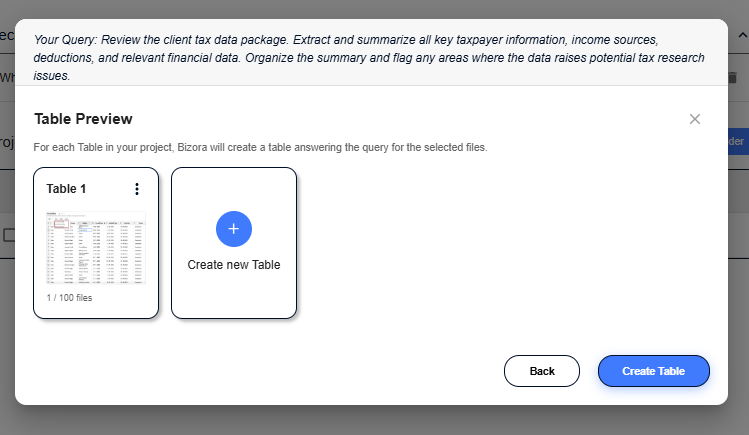
Wait for a while as Bizora processes the files and generates a structured table with one row per document and one column per question.
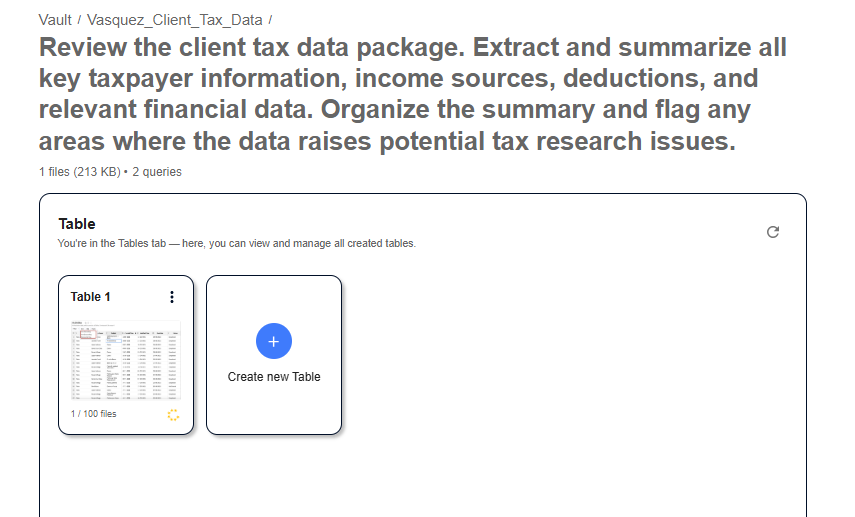
Once it's done generating, click on the table file. From here, you'll see that each cell contains the extracted information for that category and file.

Note: Unlike the AI Assistant, which processes one document per conversation, the Vault runs the same query across multiple client files at once. Upload ten client packages to a project, run one query, and get a table with ten rows of extracted data. That is where the Vault saves the most time for firms managing high volumes.
When to Use Each Method for Data Extraction and Memo Drafting in Bizora
If you're not sure of which method to use, here's a side-by-side comparison to help you decide quickly.
| Feature | AI Assistant (Method 1) | Vault (Method 2) |
|---|---|---|
| Best for | Single-client deep research and memo drafting | Batch extraction across multiple files |
| Output format | Conversational narrative with inline citations | Structured data table with categorized columns |
| Memo drafting | Yes, full Issue / Facts / Law / Analysis / Conclusion format | No (use for extraction, then AI Assistant for memo drafting) |
| File limit | Upload per conversation | Up to 100 files per project |
| Query limit | No character limit on prompts | 255-character limit per query |
| Ideal scenario | "I need a complete research memo for this client by tomorrow." | "I need to pull key data from 15 client packages before the team meeting." |
Both methods work together. You use the Vault to batch-extract data across all clients, then open the AI Assistant and pull specific documents from the Vault to draft individual research memos.
Primary authorities referenced
The examples in this tutorial invoke the following primary sources. Bizora traces every citation to the original authority so positions hold up on review:
- IRC Section 199A: Qualified business income deduction for pass-through entities
- Treas. Reg. 1.199A-5(c)(2): SSTB definition and de minimis safe harbors for specified service trades or businesses
- IRC Section 481(a): Adjustment required when changing accounting methods, including cost segregation catch-ups
- IRC Section 1091: Wash sale rules disallowing losses on securities sold and repurchased within 30 days
- 31 U.S.C. § 5314 (FBAR): Foreign bank account reporting requirements
- IRC Section 6038D (FATCA): Reporting of specified foreign financial assets
Stop spending hours on what should take minutes
You already know the math. A moderately complex client burns four to ten hours of research and memo drafting through the traditional workflow. During busy season, that adds up across every engagement on your desk.
The workflow above takes that same process and compresses it into a fraction of the time. Upload a client's documents. Bizora extracts the data, identifies the issues, and generates a citation-backed research memo without toggling between three different tools or writing from scratch in Word.
Every citation is traceable. Every conclusion shows the reasoning behind it. And when a partner or the IRS asks how you arrived at a position, the work product holds up.
Try Bizora free to see how the workflow fits your practice. No credit card required. Start Your Free Trial
Frequently Asked Questions
What should a tax research memo include?
A standard tax research memo has five sections: Facts (the client's relevant circumstances), Issues (the specific tax questions), Authorities (applicable IRC sections, regulations, and case law), Analysis (how the law applies to the facts), and Conclusion (your recommended position and action items).
Can AI write a tax research memo?
Yes. Purpose-built AI tax research tools can generate structured memos with citations to primary authority. The key distinction is between general AI tools (which may hallucinate citations) and specialized tools like Bizora that ground every answer in traceable, verifiable sources.
How long does it take to draft a tax memo with AI?
With an AI-assisted workflow, the full process from document upload to a citation-backed draft memo takes roughly 15 to 45 minutes depending on complexity. The traditional manual process typically takes four to ten hours.
What tax documents can be processed with AI extraction?
Most AI extraction tools can process W-2s, 1099 variants, K-1s, IRS Form 1040, 1120, 1065, Schedule C, brokerage statements, rental property records, and foreign account disclosures. Bizora accepts uploaded PDFs and document files directly.
Is AI-generated tax research reliable? Do I still need to review AI-generated tax memos? Yes. AI accelerates the drafting process, but professional judgment remains essential. Review the extracted data for accuracy, verify key citations, and apply your own analysis before relying on any AI-generated work product. Can the Vault process multiple client files at once? Yes. Up to 100 files per project, and a single query runs across all of them. Bizora generates a table with one row per file and columns for each data category.
It depends on the tool. General-purpose AI models frequently hallucinate citations and fabricate authority. Specialized AI tax research platforms like Bizora cite actual IRC sections, Treasury Regulations, and case law with traceable references.
Do I still need to review AI-generated tax memos?
Yes. AI accelerates the drafting process, but professional judgment remains essential. Review the extracted data for accuracy, verify key citations, and apply your own analysis before relying on any AI-generated work product.
Can the Vault process multiple client files at once?
Yes. Up to 100 files per project, and a single query runs across all of them. Bizora generates a table with one row per file and columns for each data category.